Price Tag Label Generator
Design and download printable price tag labels for retail products, shop shelves, sales, and garage sales. Choose a style, set the price, currency, optional original price for discounts, and accent color, then export the tag as a PNG or JPEG image.
Input
Output
Screenshots
Readme
What is a price tag?
A price tag is a small label attached to or displayed beside a product that shows its selling price and, optionally, related details such as the product name, unit of measurement, original price before a discount, or a SKU. Price tags help shoppers make purchase decisions at a glance and signal promotions like sales or special offers through visual cues such as bright colors, large prices, and crossed-out original prices.
In retail, price tags appear in many forms: hanging swing tags on clothing, adhesive stickers on packaged goods, printed shelf labels in supermarkets, and chalkboards or printed cards at markets and craft fairs. Their layout, typography, and color usually communicate something about the brand and the type of offer — a minimalist tag fits a boutique, while a bold yellow "−40%" burst suggests a clearance sale.
Tool description
The Price Tag Label Generator lets you design printable price tag labels in your browser and export them as PNG or JPEG images. You pick a visual style, fill in the product details and price, optionally enable a sale to show a crossed-out original price with a calculated discount badge, choose a currency, and tune the accent and text colors to match your shop or product.
The tool is fully client-side: nothing is uploaded to a server, so it is safe to use for product names, internal SKUs, or any sensitive pricing information.
Examples
Input:
- Style: Sale
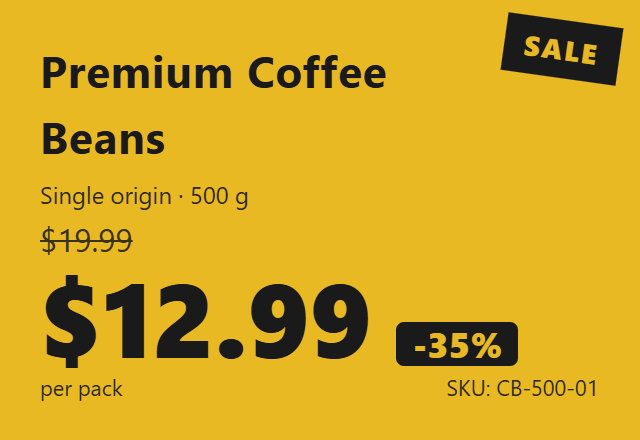
- Product name: Premium Coffee Beans
- Description: Single origin · 500 g
- Price: 12.99
- Original price: 19.99 (sale enabled)
- Currency: USD
- Unit: per pack
Output: A bold yellow sale tag showing $12.99, the original $19.99 struck through, and a −35% discount badge derived automatically from the two prices.
Features
- Five label styles: Classic, Sale, Discount Burst, Minimalist, and Supermarket layouts to match different retail contexts.
- Automatic discount calculation: when the "On sale" toggle is enabled, the percentage off is computed from the price and original price and shown on the tag.
- Currency-aware pricing: choose any ISO 4217 currency; the correct symbol appears as a prefix in the price inputs and on the rendered tag.
- Custom accent and text colors: independent color pickers for the tag's accent color and primary text color, with secondary text shaded automatically.
- Export as PNG or JPEG at 2× pixel ratio for crisp printing or sharing on the web.
Use cases
- Small shop owners preparing printed labels for shelves, market stalls, or pop-up stores without opening a graphics editor.
- Garage sale, flea market, and craft fair sellers who need clear, attractive price tags for one-off events.
- E-commerce sellers generating consistent price tag images to overlay on product photos for sale promotions and social media posts.
Style guide
| Style | Best for |
|---|---|
| Classic | Boutique products, neutral tags with a colored border |
| Sale | Promotional tags with strong colored background |
| Discount Burst | Clearance and special offers with a circular −% badge |
| Minimalist | Modern brands and curated catalogs with subtle accents |
| Supermarket | Shelf labels emphasizing a large price with cents stacked |
Options explained
- Style — Picks the overall layout of the tag.
- Product Name — Main label shown most prominently on the tag.
- Description — Secondary line under the product name (size, variant, weight, etc.).
- Unit — Short note like "per pack", "per 100 g", or "each".
- SKU — Internal product code shown in small text; leave empty to omit.
- Currency — ISO 4217 currency code that controls the symbol shown on the tag.
- Price — The current selling price.
- On sale — When enabled, displays the original (crossed-out) price and a discount badge.
- Original Price — The pre-sale price; the discount percentage is calculated as
round((original − price) / original × 100). - Accent Color — The dominant color used for borders, backgrounds, or highlights, depending on the style.
- Text Color — The primary text color; secondary text is rendered as a translucent variant of this color.
- Output Format — PNG (lossless, supports transparency) or JPEG (smaller file size).
Tips
- For supermarket-style shelf labels, keep the product name short so it fits on a single line.
- Pick a dark text color when the accent color is light (e.g. yellow), and a light text color when the accent is dark, to keep the price legible.
- The "On sale" toggle hides the original price from the rendered tag when disabled, so you can keep the value in the field while temporarily showing a non-sale label.
- Print at the tag's natural pixel size or scale by 2× — the export uses a 2× pixel ratio for sharp printing.
FAQ
Is the generated image free to use commercially? Yes. You created the design and the tool runs entirely in your browser; the output image is yours.
Where can I print these tags? Any home or office printer works for PNG/JPEG output. For best results, use sticker paper or card stock and print at 100% scale.
Why does the discount badge sometimes not appear? The badge is shown only when "On sale" is enabled and the original price is greater than the current price.
Can I change the size of the tag? The tag size is fixed per style to keep proportions correct. Resize the exported image in your image editor or printer dialog if you need a smaller or larger physical label.